
M333 Game Download APK () Free for Androids 2026
Just Now
5.3MB
V1.2.4.5
Android 5+
2434+

Description
M333 Game is an online mobile gaming platform that users can explore on their Android phones. It gives players access to different activities through one app. New users can learn about its basic options before creating an account. If you are interested in trying this platform, it is helpful to understand how the app works. This article explains the download method, account setup, login steps, and other important details in one place.
Explore more gaming options and visit our 999NB Game guide to learn about its download process and account setup.
- What Is M333 Game?
- How to Download M333 Game APK on Android
- Steps to Install M333 Game on Your Mobile
- How to Create a New Account on M333 Game
- M333 Game Login Process for Existing Users
- Activities Available on M333 Game
- How to Use the M333 Game Interface
- M333 Game Deposit Process
- How to Withdraw Balance from M333 Game
- M333 Game Referral System and Rewards
- Important Features of M333 Game
- Common M333 Game Problems and Their Solutions
- Tips for Using M333 Game Carefully
- Advantages and Disadvantages of M333 Game
- Final Review
What Is M333 Game?
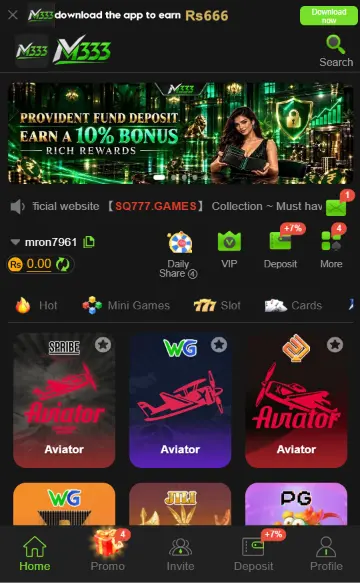
M333 Game is a mobile platform where users can explore different games and account options. Its layout is made for people who want to access gaming activities from their phones without using a computer.
After opening the app, users may find sections for games, their profile, account balance, and other services. The available options can change with app updates, so it is a good idea to check the current version before using any feature.
How to Download M333 Game APK on Android
Android users may need an APK file to install M333 APK on their phones. Before downloading, make sure you are using a trusted source and that the file belongs to the correct application.
Follow these steps to get the APK file:
- Open the trusted download source in your browser.
- Search for the M333 Game APK file.
- Check the app name and version details.
- Tap the download option.
- Wait until the file is saved on your phone.
- Open your Downloads folder to find it.
Steps to Install M333 Game on Your Mobile
Once the APK file is saved, you can start the installation process. Android may ask for permission to install an app from an outside source.
Use the following steps:
- Open the File Manager on your phone.
- Go to the Downloads folder.
- Find the M333 APK file.
- Tap the file to begin.
- Allow the requested installation permission if needed.
- Press the Install button.
- Wait for the process to finish.
- Open the app from your screen.
How to Create a New Account on M333 Game
New users may need to register before they can use all the available sections. The signup page usually asks for basic account details. The exact fields can depend on the current app version.
Here is a general account creation process:
- Open the M333 Game app.
- Find the Register or Sign Up option.
- Enter your mobile number if requested.
- Create a strong account password.
- Add a referral code only if you have one.
- Check the details you have entered.
- Submit the form to continue.
- Follow any verification steps shown on the screen.
M333 Game Login Process for Existing Users
People who already have an account can use the login page to access their profiles. This process is usually short and only requires the details linked to the account.
Follow these steps to sign in:
- Launch the M333 Game app.
- Select the Login option.
- Enter your registered mobile number or user ID.
- Type your account password.
- Check both details carefully.
- Tap the login button.
- Wait for your account page to open.
Activities Available on M333 Game
A gaming platform may offer more than one type of activity. M333 Game App may display different game sections depending on the version and current services.
Users should check the app to see which activities are actually available. Some common categories that a platform may display include:
Number-Based Games
These activities use numbers as the main part of the game. Users should read the rules on the screen before taking part.
Colour-Based Activities
Colour-based games use different colours as part of their playing system. The instructions may explain how each round works.
Quick Games
Quick games are designed around short rounds. They may be suitable for users who prefer activities that do not take much time.
Daily Activities
Some platforms display daily tasks or activities for registered users. Check the current app to see whether these options are available.
Reward Sections
A reward section may show points, coins, or other account benefits. Always read the terms before trying to collect or use any rewards.
How to Use the M333 Game Interface
A clear understanding of the app layout can help new users move between different sections. It is better to explore the main screen slowly instead of tapping every option without knowing its purpose. Here are some common areas you may find:
- Home: Shows the main screen and available activities.
- Games: Displays the game categories.
- Profile: Contains basic account information.
- Wallet: May show the current account balance.
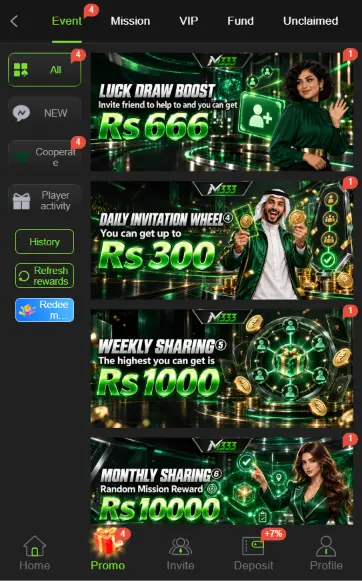
- Rewards: Displays available offers or reward details.
- Support: Provides help options if available.
M333 Game Deposit Process
Some users may want to add funds to their account through the available payment section. Before making a payment, check the rules, minimum amount, and supported methods shown in the app.
A general deposit process may include these steps:
- Open your M333 Game account.
- Find the Wallet or Deposit section.
- Read the payment instructions.
- Check the available payment methods.
- Select an option if you decide to continue.
- Enter the amount carefully.
- Review the details before confirming.
- Save the payment record for reference.
How to Withdraw Balance from M333 Game
The withdrawal section may allow eligible users to request a transfer of their available balance. Before submitting a request, read the platform’s rules and check whether your account meets the stated conditions. Follow these general steps:
- Sign in to your account.
- Open the Wallet section.
- Select Withdraw if available.
- Check the minimum withdrawal amount.
- Choose a supported payment method.
- Enter the required account details.
- Review the information carefully.
- Submit your request.
- Save the confirmation details.
M333 Game Referral System and Rewards
A referral system allows existing users to invite other people through a special code or link. If M333 Game offers this option, users may find it inside their profile or rewards section.
Here are some points to understand:
- Open the referral section in your account.
- Check whether a referral code is available.
- Read the rules before sharing it.
- Send the code only to people who want to join.
- Check the conditions for referral rewards.
- Review your referral activity when needed.
Referral rewards are not always automatic. Some platforms have special conditions that users must meet before receiving any benefit.
Important Features of M333 Game
The app may include different tools to help users manage their activities. The exact features depend on the version installed on the device.
Mobile Access
The platform is designed for phone users. This can make it easier to open the app without using a desktop computer.
Account Management
Users may find options to check their profile details and manage basic account settings.
Game Categories
Different activity sections may be available from the main screen. Users can explore them to understand the platform.
Wallet Section
The wallet area may display balance information and payment options. Always check the details before making a transaction.
Referral Option
A referral feature may help users share an invitation code with others if the service supports it.
Help Section
Some versions may provide a support area where users can look for answers to common questions.
Common M333 Game Problems and Their Solutions
Like other mobile applications, M333 Game may sometimes have technical issues. Most basic problems can be checked through a few simple steps.
App Not Opening
Restart your phone and try opening the application again. Also, check whether your device has enough free storage.
Download Not Working
Make sure your internet connection is stable. If the download stops, try again from a trusted source.
Login Failed
Check your user ID and password. If you have forgotten your password, use the recovery option if available.
App Running Slowly
Close other apps running in the background. You can also restart your device to improve performance.
Payment Pending
Check your transaction history and keep the payment receipt. Do not submit the same payment again without checking its status.
Installation Error
Check whether your Android version supports the application. Make sure the APK file is complete and has not been damaged.
Tips for Using M333 Game Carefully
Before using any online gaming platform, it is important to follow safe habits. These steps can help you protect your phone, account, and personal information.
- Download the APK from a trusted source.
- Use a strong and private password.
- Never share your login details.
- Read the rules before using any service.
- Check payment information before sending money.
- Avoid unknown links and suspicious messages.
- Do not install files from random sources.
- Set a limit on the time and money you spend.
You should also check the permissions requested by the app. If something seems unnecessary or unsafe, do not approve it without understanding why it is needed.
Advantages and Disadvantages of M333 Game
Every mobile platform has some useful points and possible drawbacks. Knowing both sides can help users make a better choice.
Advantages
- Mobile access makes it easy to open.
- Different activities may be available.
- Account options are placed in one app.
- New users can explore the main sections.
- A referral option may be available.
- The interface may support simple navigation.
Disadvantages
- The APK may not be available on the Play Store.
- Some features may change after updates.
- A stable internet connection may be needed.
- Payment requests may take time to process.
- Support options may be limited.
- Some app details may not be clearly explained.
Final Review
M333 Game is a mobile gaming platform that users can explore through an Android device. This article has covered its APK download, installation, registration, login, wallet options, and other basic sections.
Before using the app, check its source, terms, and payment rules. Protect your personal details and avoid making payments without proper information. A careful approach can help you understand the platform and make informed decisions.
Download links
How to install M333 Game Download APK (V1.2.4.5) Free for Androids 2026 APK?
1. Tap the downloaded M333 Game Download APK (V1.2.4.5) Free for Androids 2026 APK file.
2. Touch install.
3. Follow the steps on the screen.