
999AP Game App (New Version Download) For Pakistani Users
02/11/2026
4.33 MB
v3.3.2
Android 4+
10000+

Description
999AP Game is an online gaming app made for people who enjoy mobile games and digital entertainment. It brings different play options together in one place. Users can explore game features, collect points, check available rewards, and manage their accounts through a mobile phone.
The app offers a simple way to enjoy games without switching between different platforms. This article explains its main features, APK download process, account setup, and other useful details for new users in Pakistan.
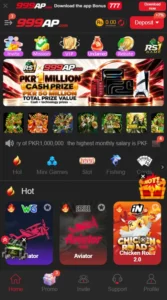
- What is 999AP Game?
- Amazing Features Inside 999AP Game
- How to Download 999AP Game APK Latest Version
- How to Install the App on Android Devices
- Popular Games on 999AP Game APK
- Special Bonuses for 999AP Game Players
- How to Deposit Money into 999AP Account
- What People Say About 999AP Game in Different Countries
- How to Withdraw Your Available Balance
- Invite Friends From 999AP Game APK
- Personal Experience with 999AP Game
- Pros and Cons of Using 999AP App
- Final Thoughts
- FAQs
What is 999AP Game?
999AP Game App is a mobile entertainment platform where users can explore different games through one account. It is designed for people who like playing online games during their free time. The platform may include daily activities, reward options, and account tools. Users can check the available sections and select a game based on their interests. Some features may change with new app updates.
Before using any reward or balance feature, users should read the current terms and understand how it works. You can also explore PAKTop Game on Apktoy.com.pk to discover another online gaming app with different entertainment options and features.
Amazing Features Inside 999AP Game
The app brings several useful options into one mobile platform. Its main aim is to make online entertainment easy to access.
Simple Mobile Layout
The app uses a mobile-based layout to help users move between different sections. Important options can be found through the main menu.
Different Game Choices
Users can explore the available game collection and select an activity they enjoy. Each game may have its own rules.
Personal Account
A personal account helps users manage their profile, check activity, and access available features.
Daily Activity Section
The platform may display daily tasks or special activities. Users should check the current conditions before joining.
Reward Information
An available rewards section can show details about points, coins, or other offers. Rewards depend on the platform’s current rules.
Balance Management
Users can view their available game balance and review account activity through the relevant section.
Referral Option
If the referral feature is active, users may receive an invitation code to share with friends.
Account Support
A help section may provide answers to common questions about login, account access, and other app-related issues.
How to Download 999AP Game APK Latest Version
Users who want to try this online gaming app should first find a trusted download source. It is important to check the APK file before installing it on an Android phone. Follow these simple steps:
- Open your mobile browser.
- Visit a trusted source for the app.
- Find the 999 AP Game download page.
- Check the available version information.
- Tap the APK download option.
- Wait until the file is saved.
- Open your phone’s Downloads folder.
- Check the file before starting installation.
How to Install the App on Android Devices
After downloading the APK file, you can begin the installation process:
- Open the File Manager on your Android phone.
- Go to the Downloads folder.
- Find the downloaded APK file.
- Tap the file to start installation.
- Allow installation from that source if you trust it.
- Follow the instructions shown on your screen.
- Wait for the process to finish.
- Open the app from your home screen.
Popular Games on 999AP Game APK
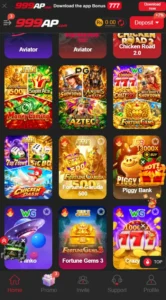
The game collection is an important part of any mobile entertainment platform. Different activities give users more choices during their free time. The exact selection inside 999 AP Game should be checked in the current version. Depending on what is available, users may find the following types of activities.
Number-Based Games
These activities use numbers as part of their main playing system. Read the instructions before starting.
Card Entertainment
Card-based games can offer different layouts and playing rules. Some require more attention than others.
Colour Selection Activities
These games use colours as a key part of their design. The available modes depend on the app.
Puzzle Games
Puzzle activities can be a good choice for users who enjoy solving small challenges.
Quick Mobile Games
Short games are useful for people who want entertainment without spending a long time on one activity.
Daily Challenges
Some platforms include special tasks that change from day to day. Check the app to see whether this feature is currently available.
Special Bonuses for 999AP Game Players
Reward features can make a mobile gaming platform more interesting. However, not every offer is available to every account. Users should always check the rules, limits, and conditions before joining a reward activity.
Daily Login Rewards
Some app versions may provide points or coins for regular account visits. Check the daily activity page for details.
New User Offers
A welcome offer may appear during registration. Read its conditions before accepting it.
Activity Rewards
Certain tasks may have a reward option after completion. The amount and requirements can vary.
Special Event Offers
Limited-time events may appear during selected periods. Their availability depends on the current app schedule.
Referral Benefits
If an invitation program is active, eligible users may receive rewards after meeting its stated conditions.
No reward should be treated as guaranteed income. Offers can change or end without being available to every user.
How to Deposit Money into 999AP Account
If the current version supports adding money to a game balance, users should first understand the payment process and its conditions.
Never send money to an unknown person or an unverified account.
Open the Balance Section
Sign in and find the wallet or balance option. Check whether the deposit feature is available.
Select an Available Method
Review the payment methods displayed inside the platform. Only use a method that you can verify.
Enter the Amount
Type the amount you want to add. Check the minimum limit and any applicable charges.
Review Payment Details
Read all payment information before continuing. Make sure the recipient and amount are correct.
Confirm the Transaction
Follow the instructions provided by the payment service. Keep your transaction record for future reference.
Check Your Account Balance
Return to your account and review the updated balance. If it does not appear, contact the relevant support service before making another payment.
What People Say About 999AP Game in Different Countries
These are sample comments for article use, not verified user reviews.
Pakistan
The game looks interesting and has different entertainment options. Its mobile layout seems simple, making it easy for beginners to explore.
India
The app offers an interesting way to enjoy online games. Clear instructions and smooth controls can make the experience better.
Bangladesh
Daily activities and reward options look attractive. However, users should read the rules before joining any activity.
Nepal
The game has a simple mobile-friendly design. New users may find it easy to explore different sections and account options.
Sri Lanka
The app looks suitable for people who enjoy mobile entertainment. A stable internet connection can help improve the playing experience.
Malaysia
The available games and account features seem interesting. Checking app safety and payment conditions before using it is important.
How to Withdraw Your Available Balance
999AP Game App Users should understand the platform’s withdrawal terms before requesting any transfer. An amount displayed in an account does not always mean it is ready for withdrawal.
If withdrawals are supported, the general process may involve the following steps.
Visit the Wallet
Open your account and find the balance management section.
Select Withdrawal
Choose the withdrawal option if it is available in your app version.
Check Your Available Amount
Review the balance and confirm whether it meets the platform’s stated withdrawal conditions.
Choose a Payment Method
Select one of the supported methods displayed on the screen.
Enter Correct Details
Fill in the required payment information. Check every number carefully to avoid mistakes.
Submit Your Request
Review the amount, possible fees, and processing information before confirming.
Review the Transaction Status
Check the history section for updates. Processing times depend on the platform and payment provider.
Invite Friends From 999AP Game APK
The referral system, if available, allows users to share an invitation link or code with other people. It can be found in the account or rewards section of some app versions:
Find Your Invitation Code
Open the referral section and look for your personal sharing code.
Copy the Referral Link
Use the copy option to save the available invitation link.
Share with Friends
Send the link to people who are interested in learning about the app. Avoid sending repeated unwanted messages.
Friend Registration
A new user may need to register through your link for the invitation to count.
Complete the Required Conditions
Some referral programs have additional rules. Read them carefully before expecting any benefit.
Check Referral Progress
Visit the referral page to review eligible invitations and their current status.
Personal Experience with 999AP Game
Editor’s note: This section is a general user-experience overview, not a claim of personal testing. For a new user, the first important thing is understanding the app layout. A clear home screen, readable text, and easy account options can make mobile gaming more comfortable.
I would suggest checking the available games and reading their instructions before using any balance-related feature. It is also worth reviewing the app permissions and privacy information. The overall experience will depend on the phone, internet connection, installed version, and current platform features.
Pros and Cons of Using 999AP App
| Pros | Cons |
|---|---|
| Mobile-based entertainment | May need internet access |
| Different game options may be available | Some features may vary |
| Personal account management | APK source needs verification |
| Possible daily activities | Reward conditions may apply |
| Balance information in one place | Payment processing may take time |
| Possible referral feature | Not all phones may be compatible |
| Easy access through Android | Updates may require a new APK |
Final Thoughts
999AP Game is an online entertainment app for users who want to explore mobile gaming options. Its possible features include account management, different activities, daily rewards, and balance-related tools.
Before downloading the APK, check its source, current version, and device compatibility. Users in Pakistan should also review the platform’s availability, payment conditions, and privacy terms.
FAQs
Does 999AP Game work on all Android phones?
Compatibility depends on your Android version, device storage, and the app’s current requirements.
Can I use 999AP Game without creating an account?
Some features may be available without registration, but account-based options may require a personal profile.
Can I change my account password?
Check the profile or security settings for a password change option. Follow the instructions shown in the app.
Why should I download the latest 999 AP APK?
A newer version may include feature changes, bug fixes, and compatibility improvements. Always verify the download source before installing it.
Download links
How to install 999AP Game App (New Version Download) For Pakistani Users APK?
1. Tap the downloaded 999AP Game App (New Version Download) For Pakistani Users APK file.
2. Touch install.
3. Follow the steps on the screen.